Tinkle The Ivories
How to Clean Your Desktop Computer Keyboard
Unless you are a typist, your keyboard is probably the second most used part of your computer, after the mouse. If you're missing any keys or some are "sticky" or jamming you are making your computer experience less pleasant than it need be.
If you are using a laptop the following isn't really for you, but did you know you can plug an ordinary mouse and/or keyboard into your laptop?
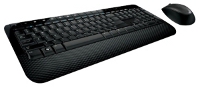 You can buy a new, good quality, Microsoft or Logitech branded keyboard from about $20 and a wired keyboard and mouse combination from about $40. Remember that if you do decide to get a new keyboard (or mouse) it will almost certainly work with any computer you buy over the next few years so it might be worth spending a little extra on a good one. New computers generally come with basic low cost mice and keyboards.
It's probably best to turn your PC off before you do this, although I seldom do.
The most often recommended method is to buy a can of compressed air that you use to blow the dust out. Usually effective but look out for dust in your eyes and mouth, not pleasant.
But we dont want to spend money if we don't need to so you can try tipping it upside down and banging it on your desk, whack it on the ends, whack it on the side and shake it. You may be surprised at how much muck has collected under the keys and comes out. Next time you'll probably want to do it outside, but that involves upplugging the thing!
You can also use a vacuum cleaner to suck the muck out from under the keys. But if you suck one of the keys off it's not very pleasant digging through the cleaners dust bag to get it out. If you like you can hold a piece of fine mesh, chicken netting or similiar over the end of the vaccuum cleaner nozzle to stop them going through. Personally I use the crevice nozzle on a vaccum cleaner, never had one sucked up yet.
If the keys are just dirty use a damp (not wet) cloth to clean them but beware, you might wash the numbers off and if water gets in the mechanism it wont like it! If that is the case leave it out in the sun or in the hotwater cupboard to dry.
On most keyboards it is possible to pull the keys off to get underneath and they'll click back on again but I seldom bother. I don't have anything valuable enough that will fit down there.
If you have to pull the keys off you used to be able to buy special little tools. I have had success with a paperclick bent into a U shape with the tips of the U folded inwards onto themselves to make wee hooks. Does take a bit of effort and no guarantees you'll get it back on again!
You can get new keyboards for laptops and if you're competent with a screwdriver you can replace them yourself but it's almost always a fiddly job and every one seems to be different so consult someone experienced or Google "replace keyboard for insert your model here laptop".
- Last updated on .